This week, we explored EdCamp. I had never heard of this concept before and even after watching the pre-class videos I was feeling a bit skeptical about the idea of “unconferences.” How is effective learning supposed to happen in such an unstructured way with such little planning? I was pleasantly surprised though when my EdCamp group had a meaningful and productive hour-long conversation about incorporating outdoor learning in diverse subject areas. Liz was our “chair” and prompted some really great discussion about challenges associated with outdoor learning, how it can be incorporated into humanities-based classes, and how to approach outdoor learning for different ages and grade levels. It was great to hear from a wide variety of teacher candidates sharing their personal experiences with outdoor learning in their own subject area and also providing ideas for colleagues in other areas. I liked noticing that despite all going through the same program, everyone’s experiences and takeaways are different enough to allow for really meaningful co-teaching. Hearing from other EdCamp groups, it sounded like everyone else had pretty good success as well in their discussions. Had I not experienced an EdCamp firsthand in this class, I’d most likely continue to be skeptical of them going forward.
Category: EDCI 336 (Page 1 of 2)
This is a category for the EdTech course. Please add this category in addition to the relevant edtech assignment category(ies).
Our EdTech Inquiry looks at the effectiveness of gamified learning through Kahoot. We chose to create a news-report-style video, for our channel called the Learning Curve. If you want to learn about the pros and cons of Kahoot, some tips for best practices, student opinions, and the impact of this tool on retention and recall, please watch our report.
References
Cameron K. E., & Bizo L. A. (2019). Use of the game-based learning platform KAHOOT! to facilitate learner engagement in Animal Science students. Research in Learning Technology, 27. https://doi.org/10.25304/rlt.v27.2225
Cpatete. (2026, March 2). Use gamification in the classroom with Digital Games for Learning. YSU. https://online.ysu.edu/degrees/education/msed/curriculum-instruction-digital-teaching/gamification-in-the-classroom/
Konuk, T., & Fidan, M. (2026). The impact of gamification on motivation in teacher education: A meta-analysis. International Journal on Social and Education Sciences, 8(1). https://ijonses.net/index.php/ijonses/article/view/5980
Mahaseth, H., Bajpai, A., & Gupta, A. (2025). Gamified Learning in Education: How Online Quizzes like Kahoot Transform Classroom Dynamics. Engineering Proceedings, 107(1), 41. https://doi.org/10.3390/engproc2025107041
M. Correia and R. Santos, “Game-based learning: The use of Kahoot in teacher education,” 2017 International Symposium on Computers in Education (SIIE), Lisbon, Portugal, 2017, pp. 1-4, doi: 10.1109/SIIE.2017.8259670
Özdemir, O. (2026). How Digital Gamified Learning Enhances Vocabulary Learning and Retention in EFL Classrooms: An Experimental Study Using Kahoot! Bartın University Journal of Faculty of Education, 15(1), 88-112. https://doi.org/10.14686/buefad.1667817
Pratama, G. A. (2020). Students’ perception of gamification to promote classroom engagement and motivation in senior high school. Language Research Society, 1(1). https://doi.org/10.33021/lrs.v1i1.1040
Rusmardiana, A., Sjuchro, D. W., Yanti, D., Daryanti, F., & Iskandar, A. (2022). Students’ perception on the use of Kahoot as a learning media. AL-ISHLAH: Jurnal Pendidikan, 14(2), 2205–2212. https://doi.org/10.35445/alishlah.v14i2.2139
Rozelle, C. (2017, December 20). 5 tips for using digital games in class. Edutopia. https://www.edutopia.org/article/5-tips-using-digital-games-class/
Wang, A. I., & Tahir, R. (2020). The effect of using Kahoot! for learning – A literature review. Computers & Education, 149, 103818. https://doi.org/10.1016/j.compedu.2020.103818
Warsihna, J., Ramdani, Z., & Prakoso, B. H. (2019). Using Kahoot to improve students’ achievement and critical thinking in undergraduate of psychology students. Proceedings of the 16th International Conference on Cognition and Exploratory Learning in Digital Age (CELDA 2019), 144–150. https://doi.org/10.33965/celda2019_201911l018
4 ways to use Kahoot in the classroom. Kesler Science – Middle School Science Curriculum. (n.d.). https://keslerscience.com/4-ways-to-use-kahoot-in-the-classroom
A month into the biking journey! Wow how time flies! I’ve been biking pretty consistently for two main reasons: As a form of cardio work since a leg injury has been preventing me from running as much as I usually do. Also has a practical form of transportation for errands and social activities.
That second one might sound like a no-brainer but I really didn’t expect myself to be using my bike for these purposes as much as I am. This past month I’ve biked to the gym, to the public library, to friends’ houses, and to lunch spots. It’s wonderful! These places I usually either bus or walk to, because driving my truck around Victoria can be such a hassle, but biking is so much faster and un-confined by schedules and stops.
With regard to cardio, biking has been the perfect way to get my heart rate up without straining my leg. I find that an hour-long bike ride somehow tires me out more than an hour-long run. I don’t really understand how that works but I found a sports science study that explores this topic and seems to validate my experience.
My dad gave me his old phone mount so I’m hoping to get that attached latter this week!
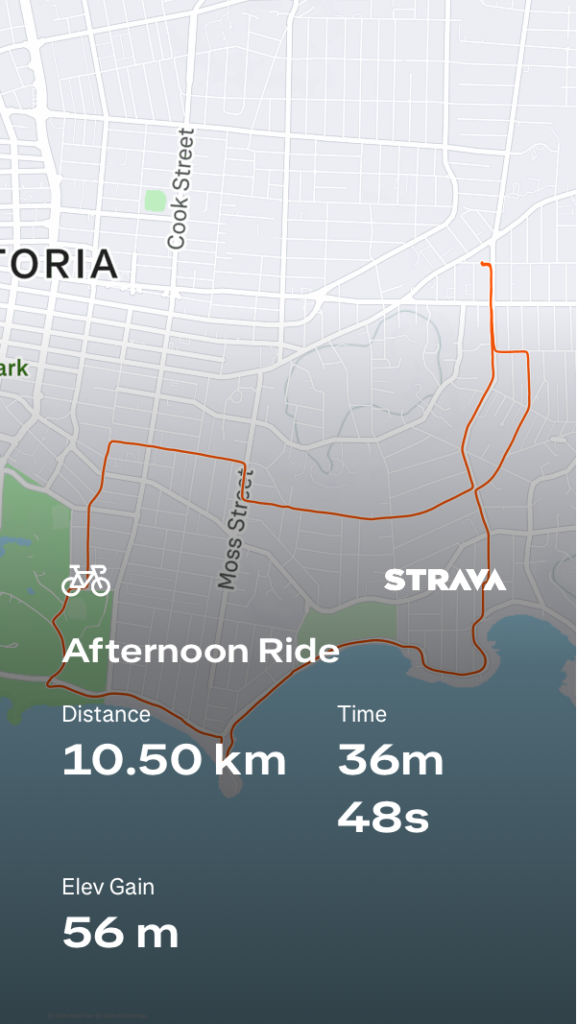
Overall, I’ve been really happy with my progress. It’s felt like a really natural addition to the routines I already have established, and with the weather getting nicer and my leg injury the timing couldn’t be better.
I think that computational thinking is an incredibly important skill for students to learn. It’s applicable to so many subjects and aspects of life in general. It feels like with the way things are going with mainstream AI, computational thinking is one of the skills that human brains are beginning to neglect in favour of asking ChatGPT. Things like “I have _____, ______, and ______ in the fridge, what can I make with them?” or “I want to go on a road trip around Vancouver Island for ____ days and do lots of _____ and _____. Where should I go?” There’s so much personal gratification to be felt when you sit down and work through a complex problem using computational thinking, it’s the reason I almost like planning trips better than going on the actual trips! Computational thinking is especially important in math. It can mean the difference between conceptual and procedural understanding of concepts and algorithms which is a gap that many high school students never bridge.
In terms of educational gameplay, I’ve seen and experienced a lot of success with games like Kahoot in the classroom. This is actually what my group inquiry project is about. I think that the key considerations of introducing a game into the classroom are: Is it meaningful? Is it accessible? And is it engaging? What I mean by meaningful is that the game serves some kind of purpose in the classroom space. Even if it isn’t directly related to content, the game could work on problem-solving skills, help strengthen connections between classmates, or act as a transition between bigger activities.
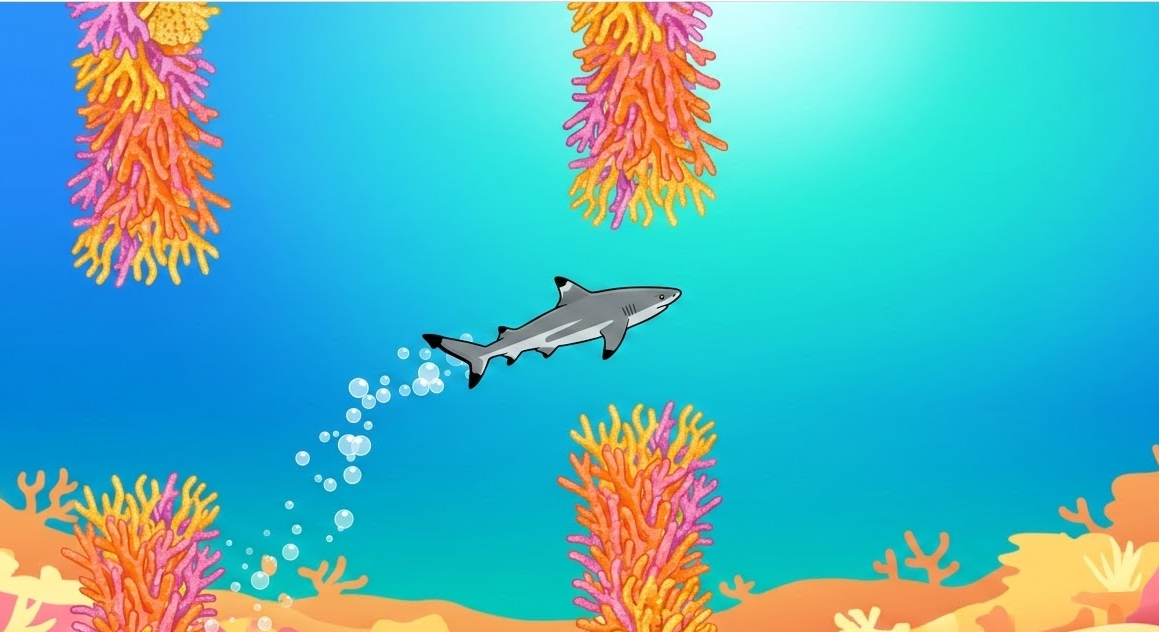
Using Google Gemini, I was able to code this simple Flappy-bird-inspired game with a black-tip reef shard swimming through a coral reef! This would be a fun game for any Biology class during a Marine Biology or Food Chain unit. I’d like to alter the game a bit so the shark can collect points by eating little fish.
I tried out the GetBadNews game and got a score of 18. I thought this game was really well laid out and very insightful. I can understand why some people in my class felt bad about playing it, but I think that’s the point. You’re supposed to be disgusted and angry, that’s what’s going to help the message stick, especially for teenagers and young adults who are even more susceptible to misleading media content.
This week I got to tour the Pacific School of Innovation and Inquiry and hear from the founder about the school’s structure and pedagogy. I found PSII really interesting, it’s obviously extremely different from my own small-town public high school experience and I can see how the independent inquiry-based structure can really align with some student’s learning styles. Personally, I don’t think teenage Annika would’ve thrived in a learning environment like this; I’ve always done well with well-defined structure and assignments. As a teacher, I feel similarly about the importance of routine and structure, for my own style and needs at least and I left the tour still feeling unsure as to what exactly a teacher’s day-to-day looks like at PSII, but I suppose that’s the point.
Some things I noticed missing from PSII’s structure were regular student collaboration and physical activity. Two components of traditional school that students often don’t actively seek out but are absolutely integral to adolescent development. I believe it’s important for students to experience productively challenging situations, like working with people they don’t naturally work well with or pushing themselves physically even when they don’t necessarily want to in the moment.
Additionally, I can’t help but consider how the aspect of tuition affects the school’s success. The founder mentioned that PSII experiences very few student behavioural issues and he attributes this to the school’s structure and environment. But I think it’s important to consider that the socioeconomic backgrounds of the students implies that they likely have more than just financial support from their families and this certainly contributes to a more regulated and peaceful school environment. In this way, PSII’s student population is not a mirror of the average public school student population so fair comparisons between the two are hard to make.
Almost two weeks since the repair process and I’ve gone on several bike rides since! My first ride back was an easy breezy 10km loop around Oak Bay. A couple steep uphills and downhills to keep things interesting and mostly right along the coastline. Unfortunately, I timed the ride poorly with the end of the school day which meant there was (relatively) quite a bit of traffic around the quiet Oak Bay area. During my ride, I listened to a podcast in one AirPod and left my other ear open to the surrounding environment. My hands got pretty cold from being exposed to the chilly air for so long on the handlebars so I made a note to bring a pair of gloves in the future.
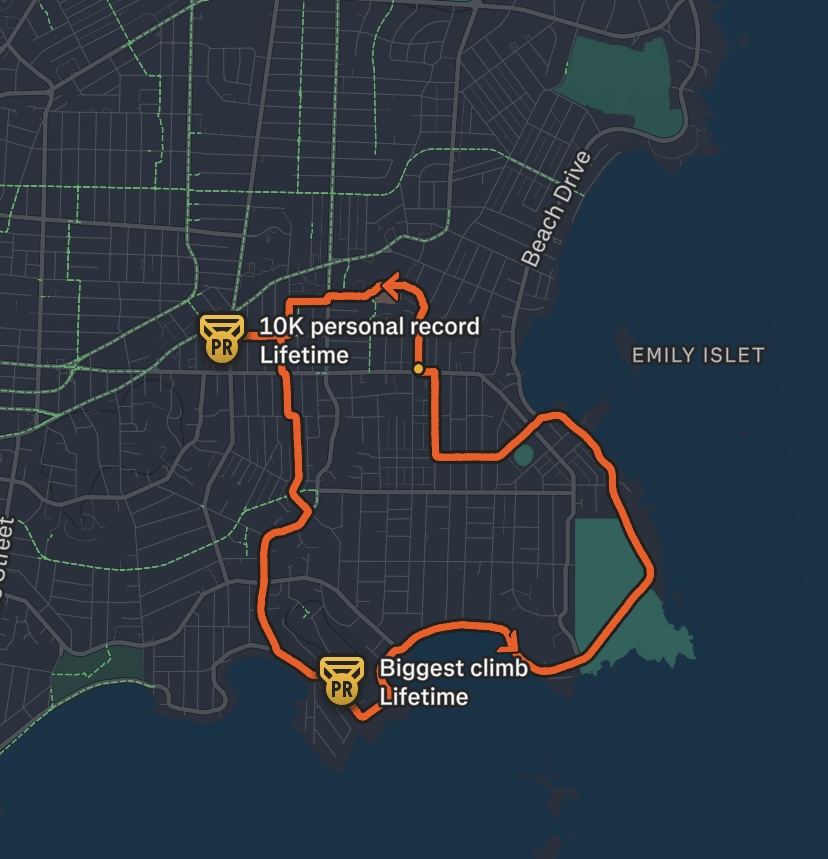
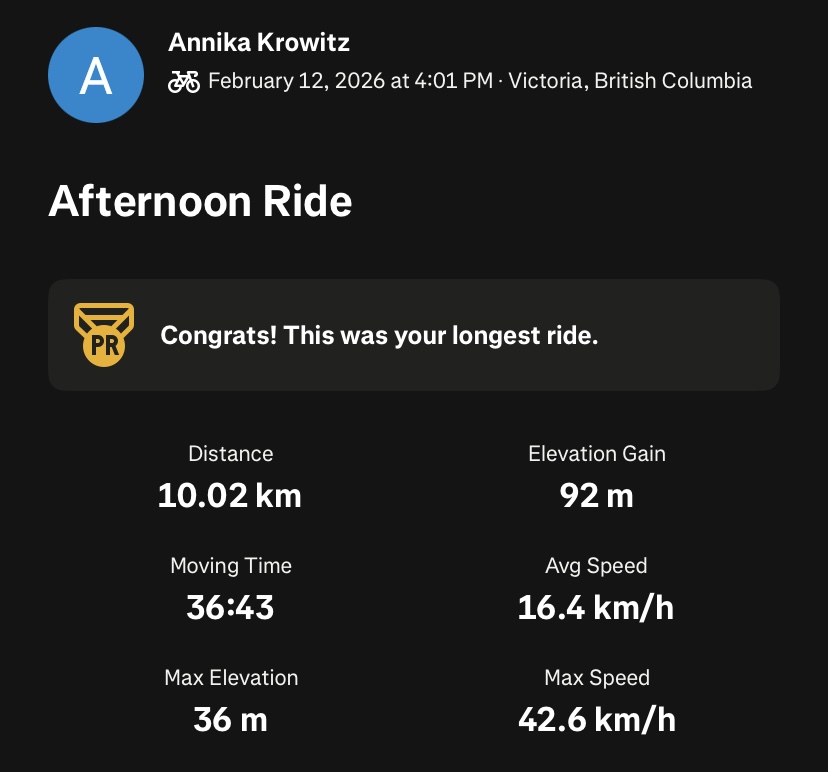
My next ride was a couple days later, I decided to bike to my friend’s apartment downtown. This is my first time biking to a specific destination and I was especially nervous to try biking in the downtown area. I planned my general route ahead of time in Google Maps to find the most efficient but bike-friendly route. Bike-friendly meaning minimal elevation change, designated bike lanes, quiet streets, and minimal left-hand turns. I didn’t have a phone mount for my bike so I did my best to memorize the route before setting out, with gloves on this time. Overall this bike ride went well, I got turned around somewhere towards the end as I attempted the navigate quiet residential streets as a means of avoiding Blanchard, but reorienting myself was quick work. The ride back home was much more relaxed as I decided to take a longer, less direct but much more enjoyable route along Dallas. I didn’t record either of these rides on Strava unfortunately.
I’ve been looking into getting a phone mount for my bike so I can navigate quicker and more safely. Here’s one I found for sale at Oak Bay Bikes.
This week I had the opportunity to attend a Pro-D session hosted by Esther Maloney from the National Film Board. My colleagues and I were introduced to the NFB website, and its education collection. Esther walked us through how to navigate the collection by filtering for subject, theme, age appropriateness, year of release, director identity, length, filming location, etc. I was blown away by the sheer quantity of educational films available for free for any subject imaginable. Some films even have supplemental lesson outlines to go along with them with additional educational resources for a teacher’s immediate use.
I’m incredibly glad that I know this resource exists now and I’ve already started browsing the collection for films to make a note of not only for future classes but also just for my own enjoyment. One that’s already stuck out to me is Borealis by Kevin McMahon. Released in 2020, it portrays the diverse relationships that exist between plants and animals in Canadian forests. As the NFB description outlines, this film is suitable for students aged 15-18 and covers topics relevant to Geography, Science, and Social Studies. There is also a mini-lesson designed to be delivered in conjunction with the film that focuses on the question: “With so many human and natural actions impacting the boreal forest, how does it continue to thrive?”
It’s hard to identify any flaws with the NFB from an educator’s perspective. One minor issue that came up during the Pro-D session was that the NFB collection is only accessible from within Canada. I know that a few of my colleagues are doing practicums abroad and therefore will not be able to access these films.
I enjoyed exploring Google Classroom this week. I saw it being widely used by teachers at Link2Practice at Belmont and was intrigued to learn more about the platform. I set up my own mock classroom and created sample assignments and announcements. Overall, Google Classroom seems like an extremely useful tool for teachers to streamline their coursework, grading, and communication with students and their guardians. I think the ability to create differentiated learning opportunities by creating small groups of students or personalized assignments for individuals in a subtle way that doesn’t single anyone out in front of their peers is an excellent tool. I also appreciate having the ability to pre-upload and schedule assignments to become active in advance. I observed a teacher at Belmont use this strategy to keep his classes organized and well-prepared. My only worry for Google Classroom is becoming too reliant on the digital platform which might have a negative impact on students and guardians that aren’t very tech-literate or find tech in general to be inaccessible for financial reasons or otherwise.
I had never heard of Google Keep before this lesson and I had a lot of fun trying it out. I think out of all the content curation tools listed, Google Keep makes the most sense for me because I already use the Google suite for virtually all personal and professional tasks. It makes sense then to keep things consistent, and utilize the most compatible tool. I appreciate that multiple tabs can be created to categorize different types of resources or topics. The one flaw I might predict, knowing myself, is this risk of becoming too focussed on the building and curation of the collection, and neglecting to effectively use the resources I’ve gathered.
This webpage describes some interesting tips for getting the most out of Google Keep.
Upon initial inspection of the bike, it’s clear even to a complete amateur such as myself that both wheels need new tubes. My first course of action was to reach out to my cousin, Evan, an avid mountain biker who conveniently lives a block away from me. He said he’d be happy to help me put new tubes in. Excellent.
The next order of business was acquiring new tubes. I call up Oak Bay Bikes. “So I need two new tubes for my bike, what information do I need to bring to the shop to make sure I get the right ones?” I’m informed about a string of numbers that can be found on the edge of my tire that convey the wheel dimensions. Bringing these numbers to the bike shop, the proper tubes are bestowed upon me for $13.50 apiece.
I wheel my bike over to Evan’s along with my new tubes, tire pump, and some fresh baked biscotti as an expression of my gratitude. Evan did a great job of going step by step through the process of replacing the tubes.
- Remove the bike wheels from the frame.
- Pry the tire from the rim using a tire lever and remove the old tube.
- Inspect the old tube and inside of the tire for sharp objects that may have caused the deflation.
- Insert the tube valve into the rim and line up the new tube along the rim.
- Work the tire over the rim and tube using one or two tire levers. This part takes the longest because you have to make sure the tube isn’t pinched or twisted and that the tire is completely flush against the rim.
- Reattach the wheels to the frame.
- Pump up the tires and you’re good to go!
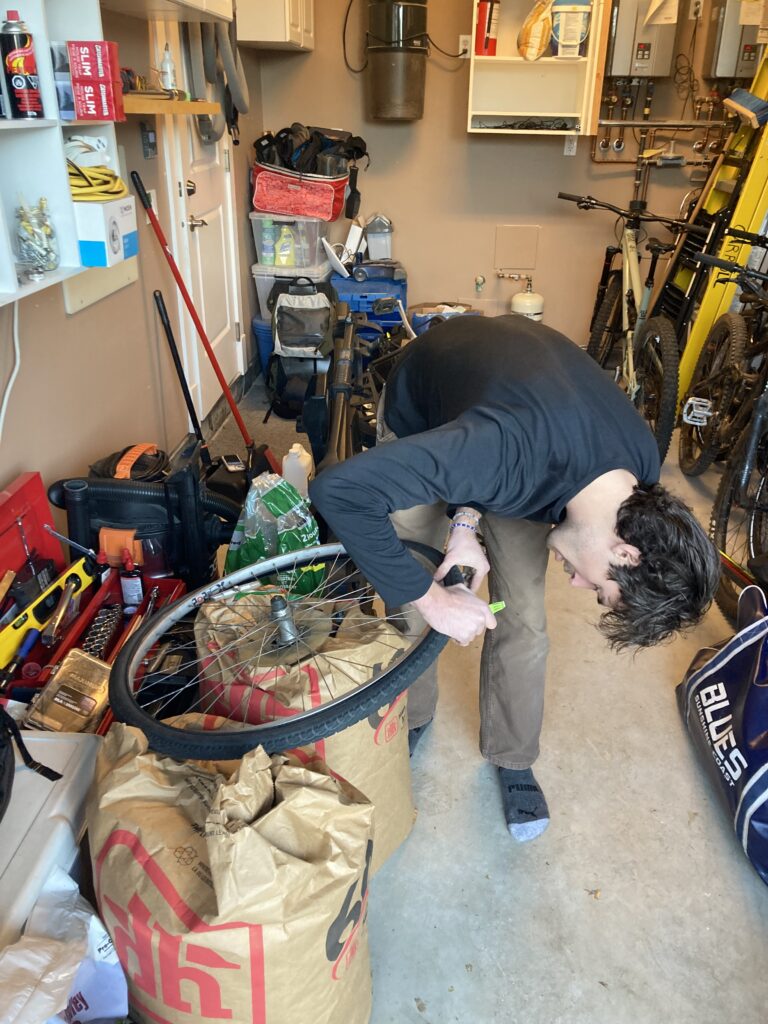
Evan also fixed my wobbly handlebars by tightening a specific screw with an allen key. So simple. He recommended I look into buying a bike multitool so I can do minor repairs and tuneups myself, although he assured me I’m always welcome to bring the bike back to his place if there’s anything I need help with.
After this intro to bike repairs, I’m feeling a lot more confident in my ability to take care of my bike and I’m very grateful for Evan and the OBB guys for their support.
I used ChatGPT to “create a lesson plan for a one-hour lesson about fermentation and its real-world applications, including a 30-minute activity to help students remember what they learned and sources.” ChaptGPT provided an in-depth overview of a lesson plan that met all the requested parameters. Including learning objectives, assessment ideas, and a wrap-up activity. The sources it listed were mainly from Britannica, Wikipedia, and Chemistry LibreTexts, and from my general understanding of fermentation processes, the science described is accurate. The classroom activity involved setting up station for students to rotate through, each station focuses on a specific type and application of fermentation (Bread and alcoholic fermentation; yogurt and lactic acid fermentation; and ethanol as biofuel). I would need to do some research into the validity of these topics but they feel like solid jumping-off points at least.
I asked perplexity.ai to outline the differences between resident, Biggs, and off-shore killer whales. The response included accurate information from verifiable sources and even summarized the information into a really concise overview in a table format for easy comparison. I noticed, that many of the sources were relatively old (2+ years) and very few were peer-reviewed research articles. When I asked the AI to only use peer-reviewed sources, it responded saying it wouldn’t be able to do so reliably.
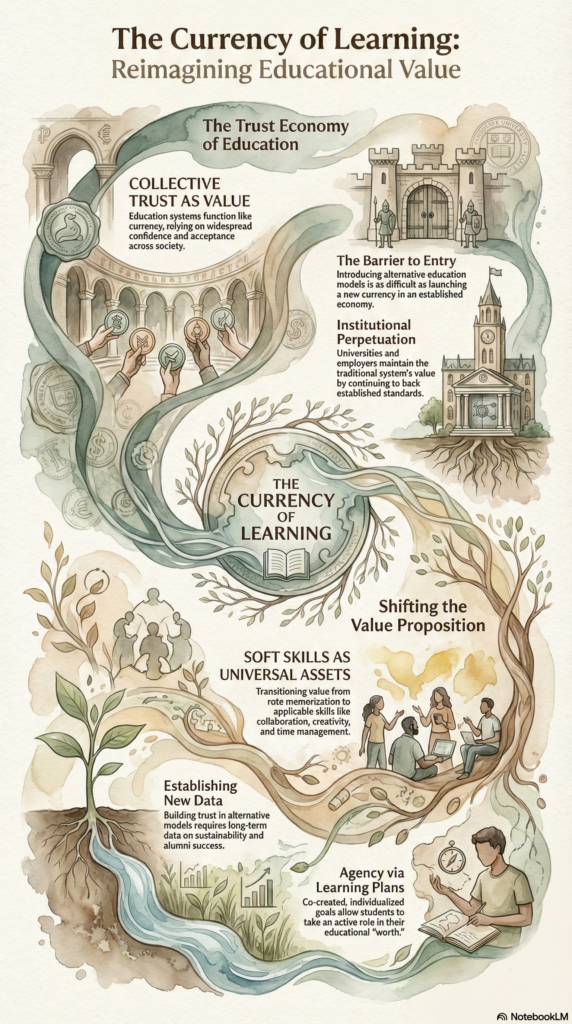
I created an infographic of my Week 1 Reflection blog post using NotebookLM. I specifically asked for it to “use neutral, earthy colours and a watercolour style, and focus the infographic on the currency of learning concept.” I haven’t spotted any glaring spelling errors in the graphic and I think the overall summarization and organization is pretty decent.
As a science teacher, I personally plan on using AI to help create rubrics (I’ve been recommended magicschool.ai) and for brainstorming engaging in-class activities and demonstrations.
In my own education experience, I’ve mainly used AI to help summarize long articles and create study guides for exams.